

Clipdinger

Categories
System and Utilities
Version
1.2.4-2
(2024-10-16)
Size
202.7
KiB
Clipdinger solves the problem that you often have to paste some text you've just recently copied to the clipboard, but which has been replaced by something you've copied more recently… It also saves the history so it'll appear just as you left it on the last shutdown.
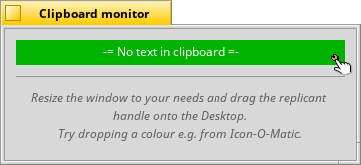
Clipdinger provides a history of your recent clippings, lets you filter it and create your own favorites. It also offers a clipboard monitor that can be used as a replicant on the Desktop, always showing the current contents.
You access the history by pressing SHIFT + ALT + V, which opens the Clipdinger window where you can select an entry with the cursor keys and paste it by hitting RETURN.
After selecting a clip, you can also paste it to the an online service by hitting ALT + P. The returned URL for the clip is put into the clipboard for you to paste into your email or IRC channel etc.
ESCAPE minimizes the window without pasting.
Please see the ReadMe available from the Help menu for more details.
Clipdinger provides a history of your recent clippings, lets you filter it and create your own favorites. It also offers a clipboard monitor that can be used as a replicant on the Desktop, always showing the current contents.
You access the history by pressing SHIFT + ALT + V, which opens the Clipdinger window where you can select an entry with the cursor keys and paste it by hitting RETURN.
After selecting a clip, you can also paste it to the an online service by hitting ALT + P. The returned URL for the clip is put into the clipboard for you to paste into your email or IRC channel etc.
ESCAPE minimizes the window without pasting.
Please see the ReadMe available from the Help menu for more details.
- Homepage
-
License:
MIT - Download HPKG file
- Changelog
3 screenshots
6 User ratings
 -
-
jadedctrl
-
thaflo
-
johan
-
thaflo
-
bronzie94
-
zdykstra